
1 回顾
1.1 Maven的好处
节省空间 对jar包做了统一管理 依赖管理
一键构建
可跨平台
应用在大型项目可提高开发效率
1.2 Maven安装部署配置
1.3 Maven的仓库
本地仓库
远程仓库(私服)
中央仓库
1.4 添加依赖
从网络上搜索
在本地重建索引,以索引的方式搜索
1.5 项目构建
1.6 依赖范围
Compile struts2 框架jar
Provided jsp-api.jar 重点
Runtime 数据库驱动包
Test junit.jar
1.7 总结
坐标 GAV
Packaging 打包方式
Jar war pom
2 整合ssh框架
2.1 依赖传递
只添加了一个struts2-core依赖,发现项目中出现了很多jar,
这种情况 叫 依赖传递

2.2 依赖版本冲突的解决
1、 第一声明优先原则
org.springframework spring-context 4.2.4.RELEASE org.apache.struts struts2-spring-plugin 2.3.24 org.apache.struts struts2-spring-plugin 2.3.24 2、 路径近者优先原则
自己添加jar包
org.springframework spring-beans 4.2.4.RELEASE 3、 排除原则
org.apache.struts struts2-spring-plugin 2.3.24 org.springframework spring-beans 4、 版本锁定原则
4.2.4.RELEASE 5.0.7.Final 2.3.24 org.springframework spring-context ${spring.version} 需求:
传客户ID 页面上显示客户信息
准备数据库
2.3 构建项目
1、 创建数据库,

2、 执行准备好的sql脚本
Sql脚本的位置:

3、 完善pom.xml文件,把ssh相关的依赖都添加上去
4.2.4.RELEASE 5.0.7.Final 2.3.24 org.springframework spring-context ${spring.version} org.springframework spring-aspects ${spring.version} org.springframework spring-orm ${spring.version} org.springframework spring-test ${spring.version} org.springframework spring-web ${spring.version} org.hibernate hibernate-core ${hibernate.version} org.apache.struts struts2-core ${struts.version} org.apache.struts struts2-spring-plugin ${struts.version} org.springframework spring-context org.springframework spring-aspects org.springframework spring-orm org.springframework spring-test org.springframework spring-web org.hibernate hibernate-core mysql mysql-connector-java 5.1.6 runtime c3p0 c3p0 0.9.1.2 org.apache.struts struts2-core org.apache.struts struts2-spring-plugin javax.servlet servlet-api 2.5 provided javax.servlet jsp-api 2.0 provided org.slf4j slf4j-log4j12 1.7.2 junit junit 4.9 test javax.servlet jstl 1.2 org.apache.maven.plugins maven-compiler-plugin 1.7 1.7 UTF-8 org.codehaus.mojo tomcat-maven-plugin 1.1 /ssh 8080 4、 完成实体类代码

5、 完成dao代码
接口
package cn.itcast.dao;import cn.itcast.entity.Customer;public interface CustomerDao {public Customer getById(Long id);}实现类
package com.itcast.dao.impl;
import org.springframework.orm.hibernate5.support.HibernateDaoSupport;
import cn.itcast.dao.CustomerDao;
import cn.itcast.entity.Customer;
public class CustomerDaoImpl extends HibernateDaoSupport implements CustomerDao {@Overridepublic Customer getById(Long id) {return this.getHibernateTemplate().get(Customer.class, id);}
}
6、 完成service代码
接口
package com.itcast.service;import cn.itcast.entity.Customer;public interface CustomerService {public Customer getById(Long id);}实现类
package com.itcast.service.impl;import com.itcast.service.CustomerService; import cn.itcast.dao.CustomerDao;import cn.itcast.entity.Customer;public class CustomerServiceImpl implements CustomerService {private CustomerDao customerDao;public void setCustomerDao(CustomerDao customerDao) {this.customerDao = customerDao;}@Overridepublic Customer getById(Long id) {return customerDao.getById(id);}}7、 完成action代码
package cn.itcast.action;import com.itcast.service.CustomerService;import com.opensymphony.xwork2.ActionSupport;import cn.itcast.entity.Customer;public class CutomerAction extends ActionSupport {//两个成员变量private Customer customer;private Long custId;public Customer getCustomer() {return customer;}public void setCustomer(Customer customer) {this.customer = customer;}private CustomerService customerService;public void setCustomerService(CustomerService customerService) {this.customerService = customerService;}public Long getCustId() {return custId;}public void setCustId(Long custId) {this.custId = custId;}public String findById(){customer = customerService.getById(custId);return SUCCESS;}}8、 拷贝配置文件并修改
从如下图位置拿到配置文件


放入到 src/main/resources目录中
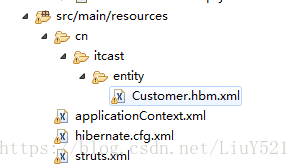
修改内容 略
9、 修改web.xml 添加spring的监听
org.springframework.web.context.ContextLoaderListener contextConfigLocation classpath:applicationContext.xml 10、 运行项目
3 分模块开发
依赖范围对依赖传递造成的影响(了解)

父工程来管理 聚合
3.1 创建父工程:
1、

2、创建出的父工程如下

3、在pom.Xml中添加以下信息:
4.2.4.RELEASE 5.0.7.Final 2.3.24 org.springframework spring-context ${spring.version} org.springframework spring-aspects ${spring.version} org.springframework spring-orm ${spring.version} org.springframework spring-test ${spring.version} org.springframework spring-web ${spring.version} org.hibernate hibernate-core ${hibernate.version} org.apache.struts struts2-core ${struts.version} org.apache.struts struts2-spring-plugin ${struts.version} org.springframework spring-context org.springframework spring-aspects org.springframework spring-orm org.springframework spring-test org.springframework spring-web org.hibernate hibernate-core mysql mysql-connector-java 5.1.6 runtime c3p0 c3p0 0.9.1.2 org.apache.struts struts2-core org.apache.struts struts2-spring-plugin javax.servlet servlet-api 2.5 provided javax.servlet jsp-api 2.0 provided org.slf4j slf4j-log4j12 1.7.2 junit junit 4.9 test javax.servlet jstl 1.2 org.apache.maven.plugins maven-compiler-plugin 1.7 1.7 UTF-8 org.codehaus.mojo tomcat-maven-plugin 1.1 /ssh 8080 4、发布到本地仓库
dao service web
3.2 创建dao子模块
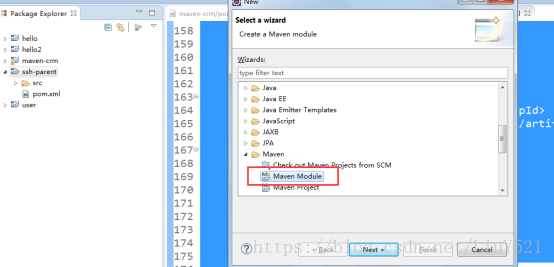
1、在ssh-parent项目上右击 ,创建时选择 Maven Module
2、填写子模块名称ssh-dao

3、把属于dao的代码拷贝到 该模块中:
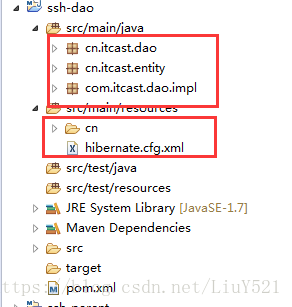
4、完成后发布到本地仓库中
3.3 创建service子模块
1、创建方式如上:
2、把属于service的代码拷贝到该工程中

3、发布到本地仓库中
3.4 创建Action子模块
1、选择war的打包方式

5、 拷贝属于action的代码和配置文件

6、 修改web.xml 添加spring监听
org.springframework.web.context.ContextLoaderListener
contextConfigLocation classpath*:applicationContext-*.xml
4、添加页面:

4 私服 nexus
安装nexus

启动服务

启动失败的解决方法:


登录nexus
用户名/密码 admin/admin123
仓库类型

Virtual 虚拟仓库
Proxy 代理仓库
Hosted 宿主仓库 本地仓库
Group 组
需求:
把dao放到私服上,然后service从私服上下载
需求 :将ssh_dao的这个工程打成jar包,并放入到私服上去.
4.1 上传dao
第一步: 需要在客户端即部署dao工程的电脑上配置 maven环境,并修改 settings.xml 文件,配置连接私服的用户和密码 。
此用户名和密码用于私服校验,因为私服需要知道上传都 的账号和密码 是否和私服中的账号和密码 一致。
第二步: 配置项目pom.xml
配置私服仓库的地址,本公司的自己的jar包会上传到私服的宿主仓库,根据工程的版本号决定上传到哪个宿主仓库,如果版本为release则上传到私服的release仓库,如果版本为snapshot则上传到私服的snapshot仓库
releases http://localhost:8081/nexus/content/repositories/releases/ snapshots http://localhost:8081/nexus/content/repositories/snapshots/ 注意:pom.xml这里
第三步:执行deploy命令发布到私服
4.2 下载dao
第一步 修改settings.xml
dev nexus http://localhost:8081/nexus/content/groups/public/ true true public Public Repositories http://localhost:8081/nexus/content/groups/public/ dev 第二步 删除本地仓库中的dao
第三步 update service工程,出现以下信息说明已经成功
