
之前,不管是二维平台,还是三维平台,都是用键盘遥控,对于turtlebot3机器人装配了激光传感器,可以测量周围360度障碍物的距离,这就非常方便使用其进行避开障碍物的自主行驶。
这里的自主行使是最基础的功能即在环境中避开障碍物在空旷处随机行驶。
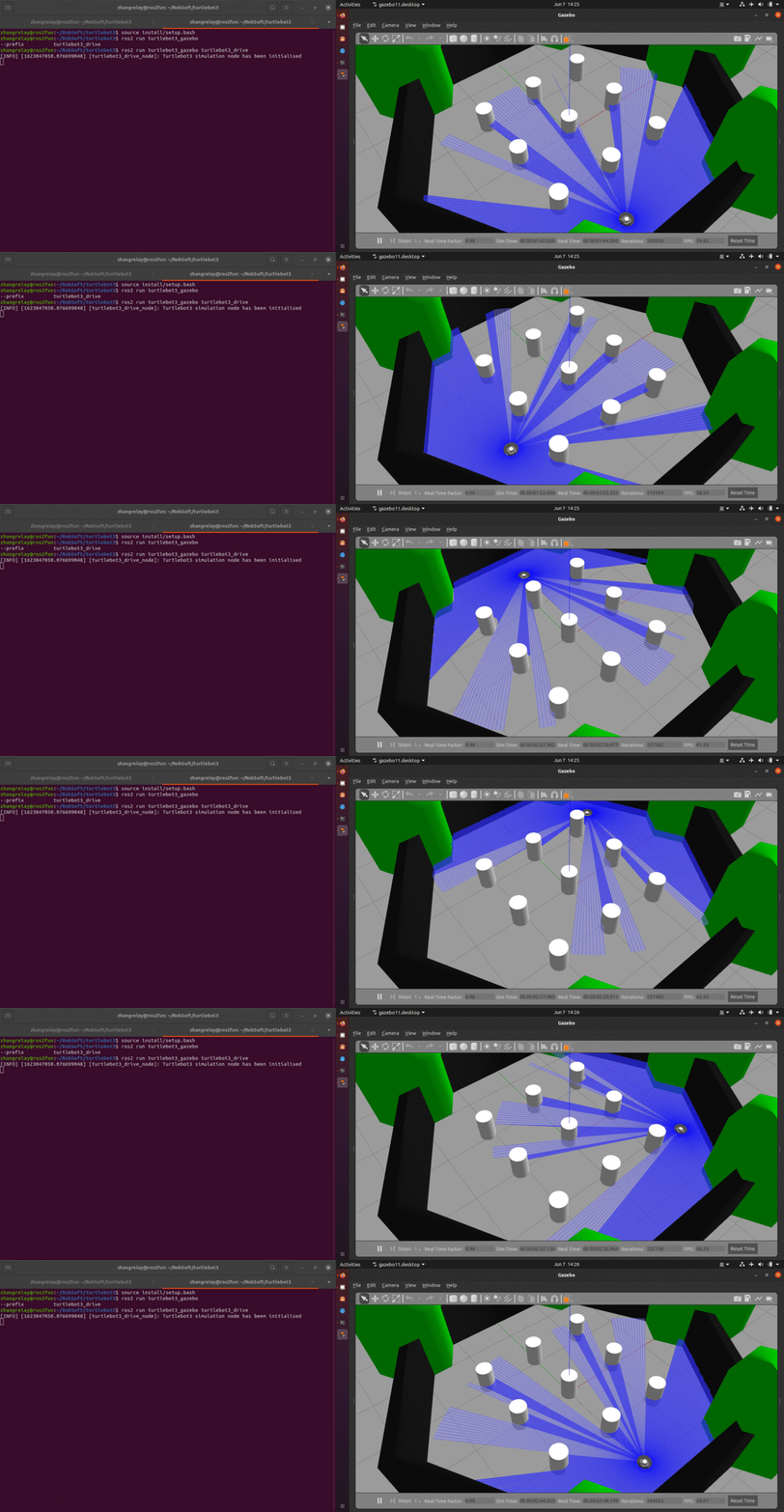
机器人选择:
- export TURTLEBOT3_MODEL=burger
- export TURTLEBOT3_MODEL=waffle_pi
二选一即可,然后不用启动键盘遥控节点,改为如下节点:
- ros2 run turtlebot3_gazebo turtlebot3_drive
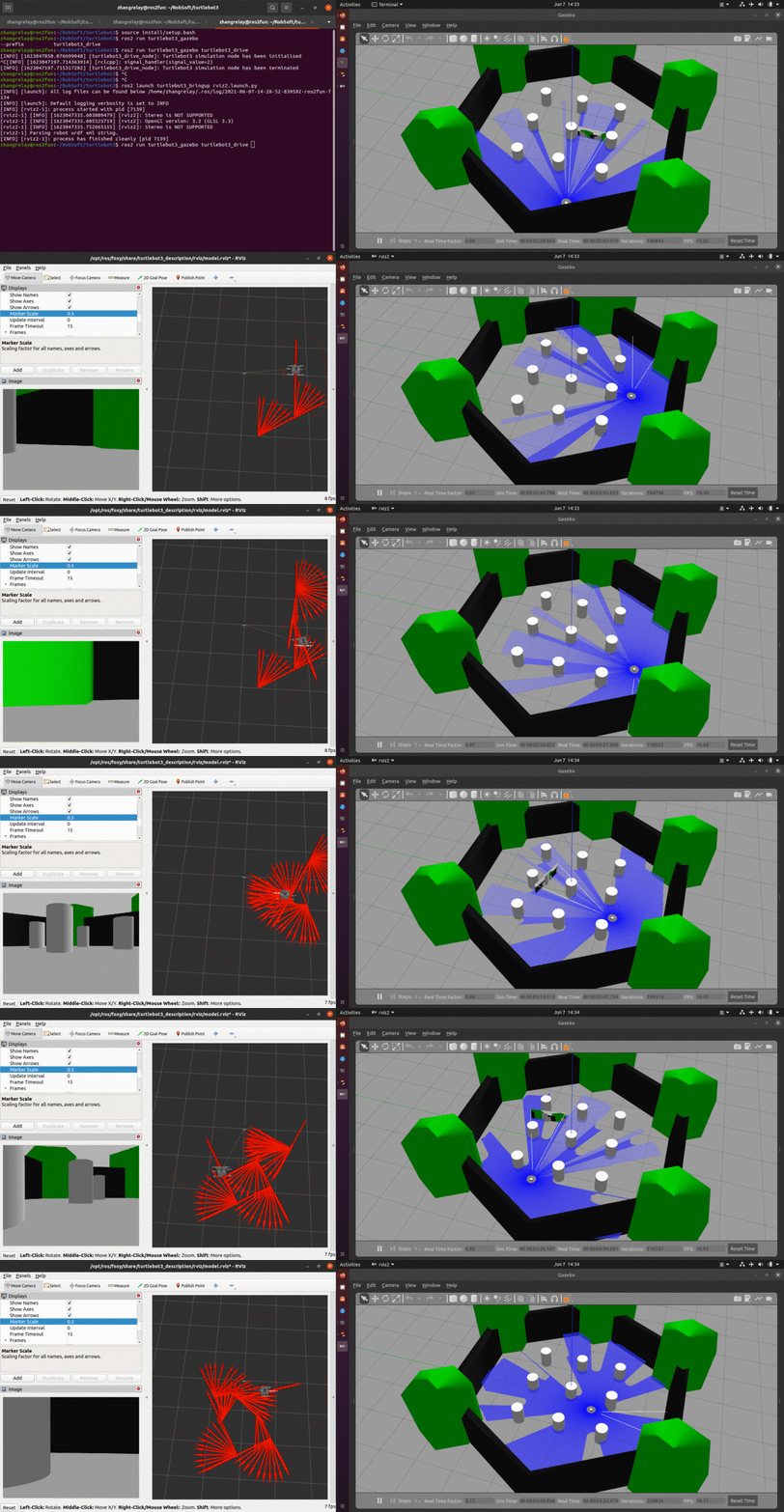
接着,继续开启三维可视化:
- ros2 launch turtlebot3_bringup rviz2.launch.py
仿真软件是Gazebo,可视化工具是rviz,不要用错了哦^_^
预备
需要ROS2+TurtleBot3仿真包。
实践
1 基本命令
需要掌握:
- ros2 run
- ros2 launch
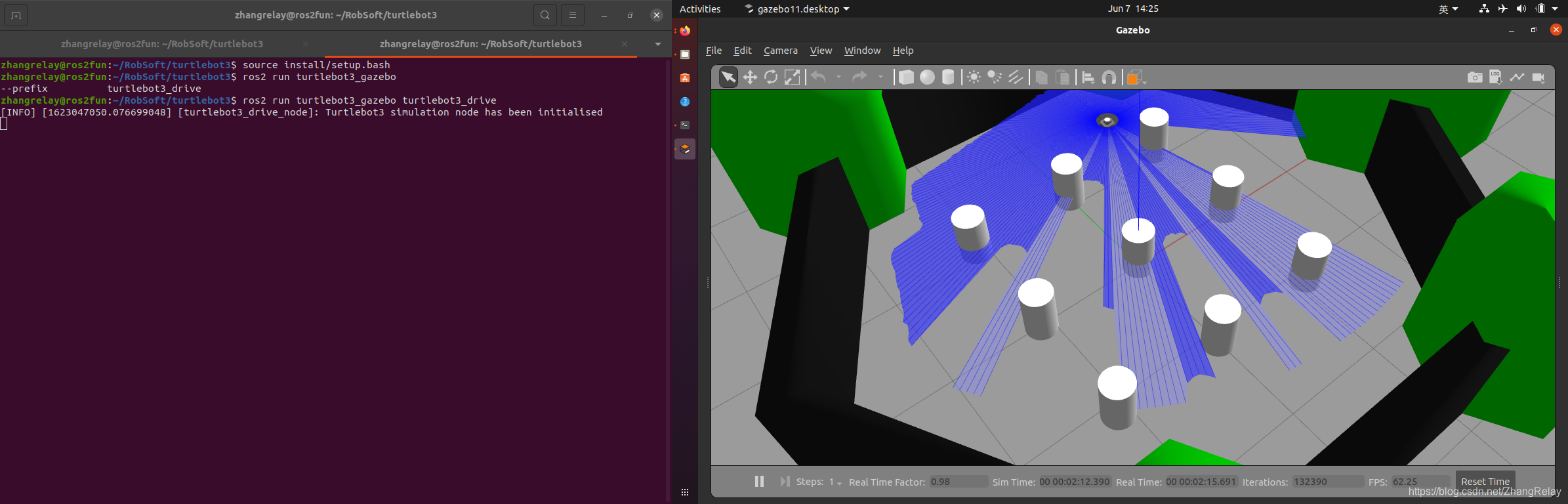
开启仿真环境和避障行驶节点。
2 rqt工具
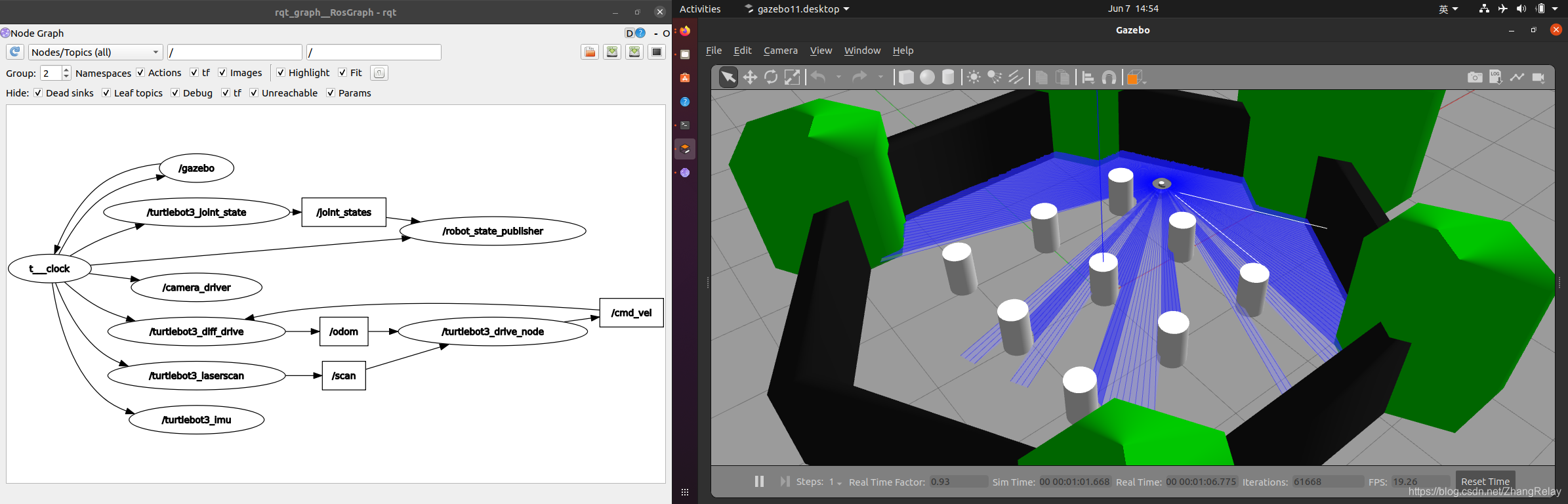
使用rqt_graph等查看,节点信息流。
3 源码阅读
launch
import osfrom ament_index_python.packages import get_package_share_directory
from launch import LaunchDescription
from launch.actions import IncludeLaunchDescription
from launch.launch_description_sources import PythonLaunchDescriptionSource
from launch.substitutions import LaunchConfigurationTURTLEBOT3_MODEL = os.environ['TURTLEBOT3_MODEL']def generate_launch_description():use_sim_time = LaunchConfiguration('use_sim_time', default='true')world_file_name = 'turtlebot3_worlds/' + TURTLEBOT3_MODEL + '.model'world = os.path.join(get_package_share_directory('turtlebot3_gazebo'),'worlds', world_file_name)launch_file_dir = os.path.join(get_package_share_directory('turtlebot3_gazebo'), 'launch')pkg_gazebo_ros = get_package_share_directory('gazebo_ros')return LaunchDescription([IncludeLaunchDescription(PythonLaunchDescriptionSource(os.path.join(pkg_gazebo_ros, 'launch', 'gzserver.launch.py')),launch_arguments={'world': world}.items(),),IncludeLaunchDescription(PythonLaunchDescriptionSource(os.path.join(pkg_gazebo_ros, 'launch', 'gzclient.launch.py')),),IncludeLaunchDescription(PythonLaunchDescriptionSource([launch_file_dir, '/robot_state_publisher.launch.py']),launch_arguments={'use_sim_time': use_sim_time}.items(),),])
drive
#include "turtlebot3_gazebo/turtlebot3_drive.hpp"#include using namespace std::chrono_literals;Turtlebot3Drive::Turtlebot3Drive()
: Node("turtlebot3_drive_node")
{/************************************************************** Initialise variables************************************************************/scan_data_[0] = 0.0;scan_data_[1] = 0.0;scan_data_[2] = 0.0;robot_pose_ = 0.0;prev_robot_pose_ = 0.0;/************************************************************** Initialise ROS publishers and subscribers************************************************************/auto qos = rclcpp::QoS(rclcpp::KeepLast(10));// Initialise publisherscmd_vel_pub_ = this->create_publisher("cmd_vel", qos);// Initialise subscribersscan_sub_ = this->create_subscription("scan", \rclcpp::SensorDataQoS(), \std::bind(&Turtlebot3Drive::scan_callback, \this, \std::placeholders::_1));odom_sub_ = this->create_subscription("odom", qos, std::bind(&Turtlebot3Drive::odom_callback, this, std::placeholders::_1));/************************************************************** Initialise ROS timers************************************************************/update_timer_ = this->create_wall_timer(10ms, std::bind(&Turtlebot3Drive::update_callback, this));RCLCPP_INFO(this->get_logger(), "Turtlebot3 simulation node has been initialised");
}Turtlebot3Drive::~Turtlebot3Drive()
{RCLCPP_INFO(this->get_logger(), "Turtlebot3 simulation node has been terminated");
}/********************************************************************************
** Callback functions for ROS subscribers
********************************************************************************/
void Turtlebot3Drive::odom_callback(const nav_msgs::msg::Odometry::SharedPtr msg)
{tf2::Quaternion q(msg->pose.pose.orientation.x,msg->pose.pose.orientation.y,msg->pose.pose.orientation.z,msg->pose.pose.orientation.w);tf2::Matrix3x3 m(q);double roll, pitch, yaw;m.getRPY(roll, pitch, yaw);robot_pose_ = yaw;
}void Turtlebot3Drive::scan_callback(const sensor_msgs::msg::LaserScan::SharedPtr msg)
{uint16_t scan_angle[3] = {0, 30, 330};for (int num = 0; num < 3; num++) {if (std::isinf(msg->ranges.at(scan_angle[num]))) {scan_data_[num] = msg->range_max;} else {scan_data_[num] = msg->ranges.at(scan_angle[num]);}}
}void Turtlebot3Drive::update_cmd_vel(double linear, double angular)
{geometry_msgs::msg::Twist cmd_vel;cmd_vel.linear.x = linear;cmd_vel.angular.z = angular;cmd_vel_pub_->publish(cmd_vel);
}/********************************************************************************
** Update functions
********************************************************************************/
void Turtlebot3Drive::update_callback()
{static uint8_t turtlebot3_state_num = 0;double escape_range = 30.0 * DEG2RAD;double check_forward_dist = 0.7;double check_side_dist = 0.6;switch (turtlebot3_state_num) {case GET_TB3_DIRECTION:if (scan_data_[CENTER] > check_forward_dist) {if (scan_data_[LEFT] < check_side_dist) {prev_robot_pose_ = robot_pose_;turtlebot3_state_num = TB3_RIGHT_TURN;} else if (scan_data_[RIGHT] < check_side_dist) {prev_robot_pose_ = robot_pose_;turtlebot3_state_num = TB3_LEFT_TURN;} else {turtlebot3_state_num = TB3_DRIVE_FORWARD;}}if (scan_data_[CENTER] < check_forward_dist) {prev_robot_pose_ = robot_pose_;turtlebot3_state_num = TB3_RIGHT_TURN;}break;case TB3_DRIVE_FORWARD:update_cmd_vel(LINEAR_VELOCITY, 0.0);turtlebot3_state_num = GET_TB3_DIRECTION;break;case TB3_RIGHT_TURN:if (fabs(prev_robot_pose_ - robot_pose_) >= escape_range) {turtlebot3_state_num = GET_TB3_DIRECTION;} else {update_cmd_vel(0.0, -1 * ANGULAR_VELOCITY);}break;case TB3_LEFT_TURN:if (fabs(prev_robot_pose_ - robot_pose_) >= escape_range) {turtlebot3_state_num = GET_TB3_DIRECTION;} else {update_cmd_vel(0.0, ANGULAR_VELOCITY);}break;default:turtlebot3_state_num = GET_TB3_DIRECTION;break;}
}/*******************************************************************************
** Main
*******************************************************************************/
int main(int argc, char ** argv)
{rclcpp::init(argc, argv);rclcpp::spin(std::make_shared());rclcpp::shutdown();return 0;
}
这里面涉及一些读取传感器关键,0度,30度,-30度的距离。
然后有一些初值需要查看头文件:
#ifndef TURTLEBOT3_GAZEBO__TURTLEBOT3_DRIVE_HPP_
#define TURTLEBOT3_GAZEBO__TURTLEBOT3_DRIVE_HPP_#include
#include
#include
#include
#include
#include #define DEG2RAD (M_PI / 180.0)
#define RAD2DEG (180.0 / M_PI)#define CENTER 0
#define LEFT   1
#define RIGHT  2#define LINEAR_VELOCITY  0.3
#define ANGULAR_VELOCITY 1.5#define GET_TB3_DIRECTION 0
#define TB3_DRIVE_FORWARD 1
#define TB3_RIGHT_TURN    2
#define TB3_LEFT_TURN     3class Turtlebot3Drive : public rclcpp::Node
{
public:Turtlebot3Drive();~Turtlebot3Drive();private:// ROS topic publishersrclcpp::Publisher::SharedPtr cmd_vel_pub_;// ROS topic subscribersrclcpp::Subscription::SharedPtr scan_sub_;rclcpp::Subscription::SharedPtr odom_sub_;// Variablesdouble robot_pose_;double prev_robot_pose_;double scan_data_[3];// ROS timerrclcpp::TimerBase::SharedPtr update_timer_;// Function prototypesvoid update_callback();void update_cmd_vel(double linear, double angular);void scan_callback(const sensor_msgs::msg::LaserScan::SharedPtr msg);void odom_callback(const nav_msgs::msg::Odometry::SharedPtr msg);
};
#endif  // TURTLEBOT3_GAZEBO__TURTLEBOT3_DRIVE_HPP_
这是一个通用的简易避障行驶代码,只要是激光传感器两轮差动小车都适用。