
Spring Cloud是一系列框架的有序集合。它利用Spring Boot的开发便利性巧妙地简化了分布式系统基础设施的开发,如服务发现注册、配置中心、消息总线、负载均衡、断路器、数据监控等,都可以用Spring Boot的开发风格做到一键启动和部署。Spring并没有重复制造轮子,它只是将目前各家公司开发的比较成熟、经得起实际考验的服务框架组合起来,通过Spring Boot风格进行再封装屏蔽掉了复杂的配置和实现原理,最终给开发者留出了一套简单易懂、易部署和易维护的分布式系统开发工具包。
接下来我们就使用SpringCloud实现一套简单的微服务架构。
以下所有代码都已开源到github上了,地址:https://github.com/lynnlovemin/softservice
Eureka(服务注册与发现)
首先引入相关的依赖包
<parent><groupId>org.springframework.bootgroupId><artifactId>spring-boot-starter-parentartifactId><version>1.5.9.RELEASEversion><relativePath/> parent><properties><project.build.sourceEncoding>UTF-8project.build.sourceEncoding><project.reporting.outputEncoding>UTF-8project.reporting.outputEncoding><java.version>1.8java.version>properties><dependencies><dependency><groupId>org.springframework.cloudgroupId><artifactId>spring-cloud-starter-eurekaartifactId>dependency><dependency><groupId>org.springframework.cloudgroupId><artifactId>spring-cloud-starter-eureka-serverartifactId>dependency><dependency><groupId>org.springframework.bootgroupId><artifactId>spring-boot-starter-webartifactId>dependency><dependency><groupId>org.springframework.bootgroupId><artifactId>spring-boot-starter-testartifactId><scope>testscope>dependency>dependencies><dependencyManagement><dependencies><dependency><groupId>org.springframework.cloudgroupId><artifactId>spring-cloud-dependenciesartifactId><version>Dalston.RC1version><type>pomtype><scope>importscope>dependency>dependencies>dependencyManagement><build><plugins><plugin><groupId>org.springframework.bootgroupId><artifactId>spring-boot-maven-pluginartifactId>plugin>plugins>build><repositories><repository><id>spring-milestonesid><name>Spring Milestonesname><url>https://repo.spring.io/milestoneurl><snapshots><enabled>falseenabled>snapshots>repository>repositories>配置application.yml
server:port: 8761
eureka:instance:hostname: localhostclient:registerWithEureka: falsefetchRegistry: falseserviceUrl:defaultZone: http://${eureka.instance.hostname}:${server.port}/eureka/
创建启动类Application
@EnableEurekaServer
@SpringBootApplication
public class Application {public static void main(String[] args) {SpringApplication.run(Application.class, args);}
}
运行main方法,浏览器访问:http://localhost:8761,我们就能在浏览器看到如下界面:
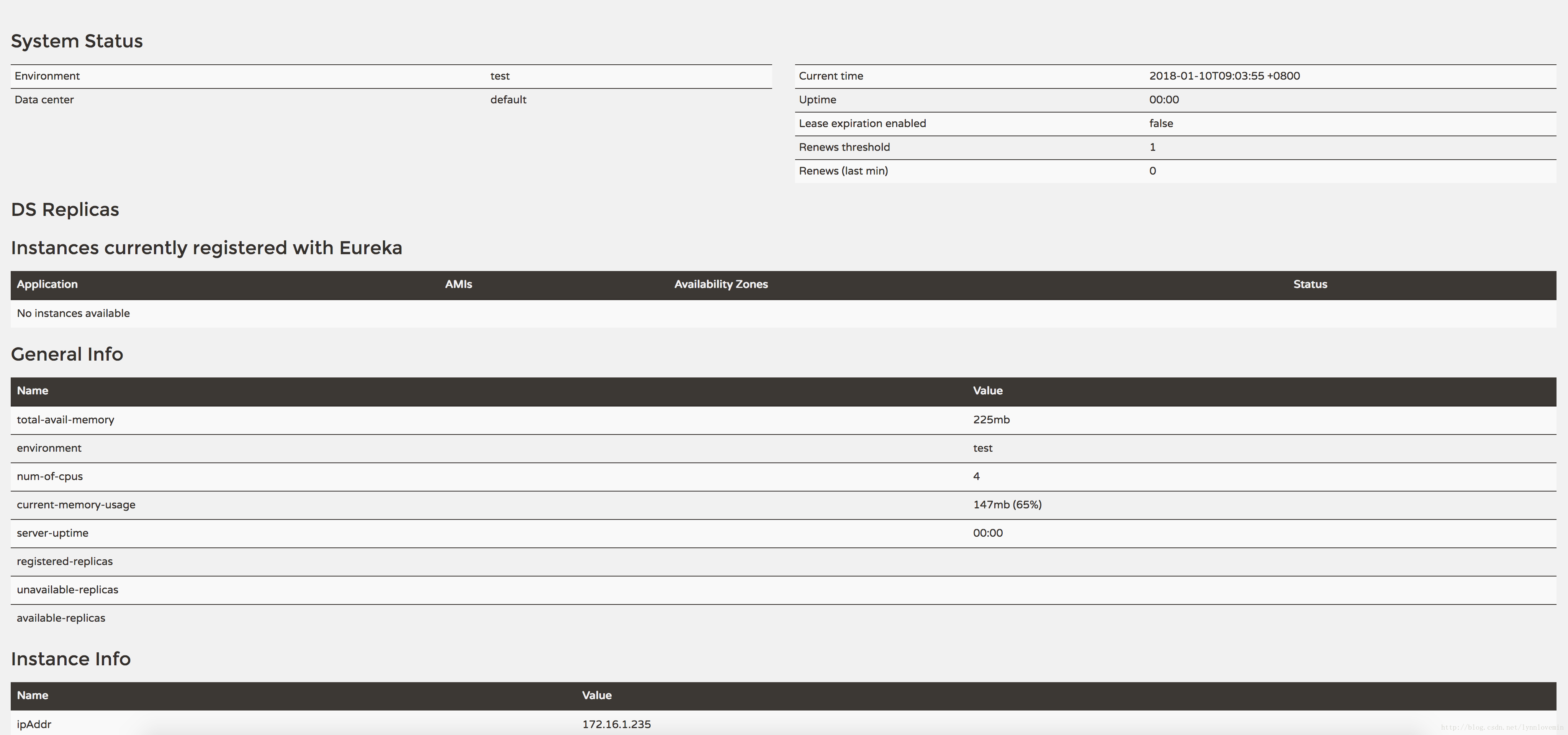
说明eureka启动成功。
接下来,我们实现负债均衡、断路器、网关、客户端,所有的服务都应该注册到eureka中,并且访问eureka就能看到所有注册的服务
client(客户端)
pom.xml
<parent><groupId>org.springframework.bootgroupId><artifactId>spring-boot-starter-parentartifactId><version>1.5.9.RELEASEversion><relativePath/> parent><properties><project.build.sourceEncoding>UTF-8project.build.sourceEncoding><project.reporting.outputEncoding>UTF-8project.reporting.outputEncoding><java.version>1.8java.version>properties><dependencies><dependency><groupId>org.springframework.cloudgroupId><artifactId>spring-cloud-starter-eurekaartifactId>dependency><dependency><groupId>org.springframework.bootgroupId><artifactId>spring-boot-starter-webartifactId>dependency><dependency><groupId>org.springframework.bootgroupId><artifactId>spring-boot-starter-testartifactId><scope>testscope>dependency>dependencies><dependencyManagement><dependencies><dependency><groupId>org.springframework.cloudgroupId><artifactId>spring-cloud-dependenciesartifactId><version>Dalston.RC1version><type>pomtype><scope>importscope>dependency>dependencies>dependencyManagement><build><plugins><plugin><groupId>org.springframework.bootgroupId><artifactId>spring-boot-maven-pluginartifactId>plugin>plugins>build><repositories><repository><id>spring-milestonesid><name>Spring Milestonesname><url>https://repo.spring.io/milestoneurl><snapshots><enabled>falseenabled>snapshots>repository>repositories>application.yml
eureka:client:serviceUrl:defaultZone: http://localhost:8761/eureka/ #这里注册到eureka中
server:port: 8763
spring:application:name: service-hi
Application类
@SpringBootApplication
@EnableEurekaClient
@RestController
public class Application {public static void main(String[] args) {SpringApplication.run(Applicatioin.class, args);}@Value("${server.port}")String port;//这里我们提供一个接口@RequestMapping("/hi")public String home(@RequestParam String name) {return "hi "+name+",i am from port:" +port;}
}
Feign(负债均衡、断路器)
pom.xml
<parent><groupId>org.springframework.bootgroupId><artifactId>spring-boot-starter-parentartifactId><version>1.5.9.RELEASEversion><relativePath/> parent><properties><project.build.sourceEncoding>UTF-8project.build.sourceEncoding><project.reporting.outputEncoding>UTF-8project.reporting.outputEncoding><java.version>1.8java.version>properties><dependencies><dependency><groupId>org.springframework.cloudgroupId><artifactId>spring-cloud-starter-eurekaartifactId>dependency><dependency><groupId>org.springframework.bootgroupId><artifactId>spring-boot-starter-webartifactId>dependency><dependency><groupId>org.springframework.cloudgroupId><artifactId>spring-cloud-starter-feignartifactId>dependency><dependency><groupId>org.springframework.bootgroupId><artifactId>spring-boot-starter-actuatorartifactId>dependency><dependency><groupId>org.springframework.cloudgroupId><artifactId>spring-cloud-starter-hystrix-dashboardartifactId>dependency><dependency><groupId>org.springframework.bootgroupId><artifactId>spring-boot-starter-testartifactId><scope>testscope>dependency>dependencies><dependencyManagement><dependencies><dependency><groupId>org.springframework.cloudgroupId><artifactId>spring-cloud-dependenciesartifactId><version>Dalston.RC1version><type>pomtype><scope>importscope>dependency>dependencies>dependencyManagement><build><plugins><plugin><groupId>org.springframework.bootgroupId><artifactId>spring-boot-maven-pluginartifactId>plugin>plugins>build><repositories><repository><id>spring-milestonesid><name>Spring Milestonesname><url>https://repo.spring.io/milestoneurl><snapshots><enabled>falseenabled>snapshots>repository>repositories>application.yml
eureka:client:serviceUrl:defaultZone: http://localhost:8761/eureka/
server:port: 8765
spring:application:name: service-feign
feign:hystrix:enabled: true
Application类
@SpringBootApplication
@EnableDiscoveryClient
@EnableFeignClients
@EnableHystrixDashboard
public class Application {public static void main(String[] args) {SpringApplication.run(Application.class, args);}
}
然后再提供一个service,他的作用就是做负债均衡和断路器功能
@FeignClient(value = "service-hi",fallback = SchedualServiceHiHystric.class)
public interface SchedualServiceHi {@RequestMapping(value = "/hi",method = RequestMethod.GET)String sayHiFromClientOne(@RequestParam(value = "name") String name);
}
@Component
public class SchedualServiceHiHystric implements SchedualServiceHi {@Overridepublic String sayHiFromClientOne(String name) {return "sorry "+name;}
}FeignClient我们指定之前创建client时指定的name:service-hi,fallback指定服务不可用时的返回数据,这样我们启动多个client时就可以看到http请求时会交替访问不同的feign端口,当停掉clien时再访问接口会返回错误信息。
zuul(服务网关)
在一般情况下,我们不会直接暴露客户端给外部,而是通过服务网关来转发,内部服务都是在局域网内通信,外部访问不了,通过服务网关,我们还可以统一做接口的安全性校验,统一拦截,请看代码:
pom.xml
<parent><groupId>org.springframework.bootgroupId><artifactId>spring-boot-starter-parentartifactId><version>1.5.9.RELEASEversion><relativePath/> parent><properties><project.build.sourceEncoding>UTF-8project.build.sourceEncoding><project.reporting.outputEncoding>UTF-8project.reporting.outputEncoding><java.version>1.8java.version>properties><dependencies><dependency><groupId>org.springframework.cloudgroupId><artifactId>spring-cloud-starter-eurekaartifactId>dependency><dependency><groupId>org.springframework.bootgroupId><artifactId>spring-boot-starter-webartifactId>dependency><dependency><groupId>org.springframework.cloudgroupId><artifactId>spring-cloud-starter-zuulartifactId>dependency><dependency><groupId>org.springframework.bootgroupId><artifactId>spring-boot-starter-testartifactId><scope>testscope>dependency>dependencies><dependencyManagement><dependencies><dependency><groupId>org.springframework.cloudgroupId><artifactId>spring-cloud-dependenciesartifactId><version>Dalston.RC1version><type>pomtype><scope>importscope>dependency>dependencies>dependencyManagement><build><plugins><plugin><groupId>org.springframework.bootgroupId><artifactId>spring-boot-maven-pluginartifactId>plugin>plugins>build><repositories><repository><id>spring-milestonesid><name>Spring Milestonesname><url>https://repo.spring.io/milestoneurl><snapshots><enabled>falseenabled>snapshots>repository>repositories>application.yml
eureka:client:serviceUrl:defaultZone: http://localhost:8761/eureka/
server:port: 8080
spring:application:name: service-zuul
zuul:routes:api-b:path: /api/**serviceId: service-feign #凡是以api开始的请求都访问service-feign服务
Application类
@EnableZuulProxy
@EnableEurekaClient
@SpringBootApplication
public class Application {public static void main(String[] args) {SpringApplication.run(Application.class, args);}
}
启动Application,访问:http://localhost:8080/api/hi,就能访问到之前我们定义的接口,接下来我们做接口的拦截:
/*** filterType:返回一个字符串代表过滤器的类型,在zuul中定义了四种不同生命周期的过滤器类型,具体如下:pre:路由之前routing:路由之时post: 路由之后error:发送错误调用filterOrder:过滤的顺序shouldFilter:这里可以写逻辑判断,是否要过滤,本文true,永远过滤。run:过滤器的具体逻辑。可用很复杂,包括查sql,nosql去判断该请求到底有没有权限访问。*/
@Component
public class MyFilter extends ZuulFilter{private static Logger log = LoggerFactory.getLogger(MyFilter.class);@Overridepublic String filterType() {return "pre";}@Overridepublic int filterOrder() {return 0;}@Overridepublic boolean shouldFilter() {return true;}@Overridepublic Object run() {RequestContext ctx = RequestContext.getCurrentContext();HttpServletRequest request = ctx.getRequest();log.info(String.format("%s >>> %s", request.getMethod(), request.getRequestURL().toString()));Object accessToken = request.getParameter("token");if(accessToken == null) {log.warn("token is empty");ctx.setSendZuulResponse(false);ctx.setResponseStatusCode(401);try {ctx.getResponse().getWriter().write("token is empty");}catch (Exception e){}return null;}log.info("ok");return null;}
}
这样我们在调用接口前会先执行MyFilter类中的run方法,在这个方法里可以做一系列安全验证,比如token。
好了,一个简单的微服务架构就已经搭建完成了。
以上所有代码都已开源到github上了,地址:https://github.com/lynnlovemin/softservice