js
import F2 from "../../../../components/f2-canvas/lib/f2"
let pie = null;
function setOption(pie,a,b,c,d,e) { var map = {'待检查': ((b/a)*100).toFixed(2)+'%','处理中':((c/a)*100).toFixed(2)+'%','流转中':((d/a)*100).toFixed(2)+'%','已结束': ((e/a)*100).toFixed(2)+'%',};let data = [{name: '待检查',percent: b/a,a: '1'},{name: '处理中',percent: c/a,a: '1'},{name: '流转中',percent: d/a,a: '1'},{name: '已结束',percent: e/a,a: '1'}];pie.source(data, {percent: {formatter: function formatter(val) {return val * 100 + '%';}}}); pie.legend({position: 'right',itemFormatter: function itemFormatter(val) {return val + ' ' + map[val];}});pie.tooltip(false);pie.coord('polar', {transposed: true,radius: 0.85});pie.axis(false);pie.interval().position('a*percent').color('name', ['#2d8cf0', '#19be6b','#ff9900','#bbbec4']).adjust('stack').style({lineWidth: 1,stroke: '#fff',lineJoin: 'round',lineCap: 'round'}).animate({appear: {duration: 1200,easing: 'bounceOut'}});pie.render();
};
const app = getApp();
Page({data: {optspie: {lazyLoad: true},},onLoad: function (options) {this.getPlanList();},getPlanList() {wx.showLoading({title: '数据加载中',});var options = {url: '#',data:'#'};app.call.request(options, this, this.sucesssPlanHandelList, this.failFun);},sucesssPlanHandelList(res){wx.hideLoading();console.log('planHandel',res);if(res){this.setData({allTaskNum:res.allTaskNum,completedRate:res.completedRate,oneTimePassRate:res.oneTimePassRate,uncheckTaskNum:res.uncheckTaskNum,processingTaskNum:res.processingTaskNum,circulatingTaskNum:res.circulatingTaskNum,endedTaskNum:res.endedTaskNum,planHandelContent:res,});this.firstComponent = this.selectComponent('#pie');this.getOptions(res.allTaskNum,res.uncheckTaskNum,res.processingTaskNum,res.circulatingTaskNum,res.endedTaskNum);}},failFun(err){wx.hideLoading();app.toast('数据获取失败');console.log('fail', err);},getOptions(a,b,c,d,e){this.firstComponent.init((canvas, width, height) => { const chart = new F2.Chart({el: canvas,width,height,animate: false});setOption(chart,a,b,c,d,e);})},
})
把图表转化为图片:f2-canvas.js
import Renderer from './lib/renderer';
import F2 from './lib/f2';
F2.Util.addEventListener = function (source, type, listener) {source.addListener(type, listener);
};F2.Util.removeEventListener = function (source, type, listener) {source.removeListener(type, listener);
};F2.Util.createEvent = function (event, chart) {const type = event.type;let x = 0;let y = 0;const touches = event.touches;if (touches && touches.length > 0) {x = touches[0].x;y = touches[0].y;}return {type,chart,x,y};
};Component({properties: {pieSelect: {type: String,value: 'f2-canvas'},canvasId: {type: String,value: 'canvas-id'},opts: {type: Object}},data: {},ready: function () {if (!this.data.opts) {console.warn('组件需绑定 opts 变量,例: +'canvas-id="mychart-bar" opts="{{ opts }}">');return;}if (!this.data.opts.lazyLoad) {this.init();}},methods: {init: function (callback) {const version = wx.version.version.split('.').map(n => parseInt(n, 10));const isValid = version[0] > 1 || (version[0] === 1 && version[1] > 9) ||(version[0] === 1 && version[1] === 9 && version[2] >= 91);if (!isValid) {console.error('微信基础库版本过低,需大于等于 1.9.91。');return;}const ctx = wx.createCanvasContext(this.data.canvasId, this); const canvas = new Renderer(ctx);this.canvas = canvas;const query = wx.createSelectorQuery().in(this);query.select('.f2-canvas').boundingClientRect(res => {if (typeof callback === 'function') {this.chart = callback(canvas, res.width, res.height);} else if (this.data.opts && this.data.opts.onInit) {this.chart = this.data.opts.onInit(canvas, res.width, res.height);}}).exec();var that = this;setTimeout(function () {wx.canvasToTempFilePath({canvasId: that.data.canvasId,success(res) {console.log('res', res.tempFilePath);that.setData({imgUrl: res.tempFilePath,})},fail(err) {console.log('err', err);}}, that)}, 1500);},touchStart(e) {if (this.canvas) {this.canvas.emitEvent('touchstart', [e]);}},touchMove(e) {if (this.canvas) {this.canvas.emitEvent('touchmove', [e]);}},touchEnd(e) {if (this.canvas) {this.canvas.emitEvent('touchend', [e]);}},press(e) {if (this.canvas) {this.canvas.emitEvent('press', [e]);}},}
})
f2-canvas.wxml
<image wx:if="{{imgUrl}}" src = "{{imgUrl}}" style = "width: 100%;height: 100%;"></image>
<canvas
wx:else
class="f2-canvas"
canvas-id="{{ canvasId }}"
bindinit="init"
bindtouchstart="touchStart"
bindtouchmove="touchMove"
bindtouchend="touchEnd"
bindlongtap="press"
>
</canvas>
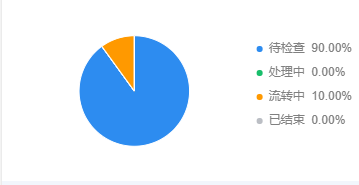
最后放一张图片
版权声明
本文来自互联网用户投稿,文章观点仅代表作者本人,不代表本站立场。本站仅提供信息存储空间服务,不拥有所有权,不承担相关法律责任。如若转载,请注明出处。如若内容有涉嫌抄袭侵权/违法违规/事实不符,请点击 举报 进行投诉反馈!
